Google Play's Trader Status Declaration — Skip It Past February 1, 2027, and Your App Gets Pulled
A Red Badge Shows Up in Play Console
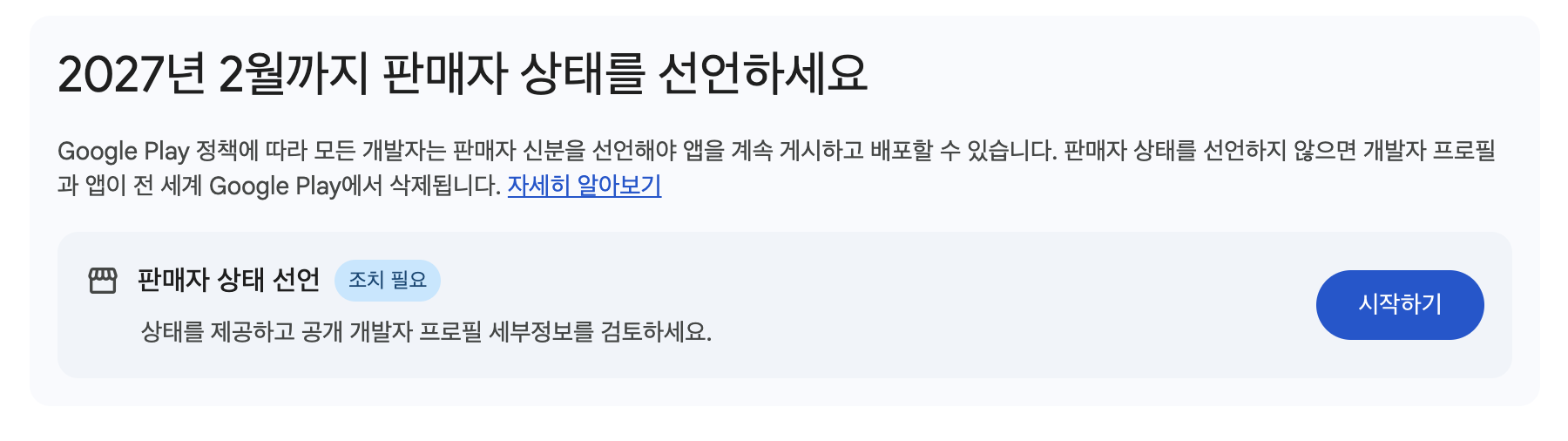
I logged into Play Console the other day and noticed a badge I hadn't seen before. The heading read "Declare your trader status by February 2027," and right under an item labeled "Trader status declaration" sat a badge that said "Action needed." My first instinct was to brush it off as just another policy update, but one line underneath it caught my eye.
"If you don't declare your trader status, your developer profile and apps will be removed from Google Play worldwide."
"Removed worldwide" isn't something you can just skim past. I looked into it, went ahead and completed the declaration myself, and figured I'd write down what I learned.
What a Trader Status Declaration Actually Is
A Trader Status Declaration is the process where a developer who has published an app on Google Play states whether they're a "Trader" or a "Non-trader." A trader, in this context, is any individual or organization acting for purposes related to their trade, business, craft, or profession. In plain terms, it's a declaration of whether you have a profit motive behind your app.
The reason this policy suddenly appeared traces back to the European Union's Digital Services Act (DSA). The DSA requires online marketplaces to transparently disclose identity information about the traders operating on their platform, and since Google Play is an app marketplace, it falls under that regulation. That's why trader information gets surfaced as "Provider information" specifically to users in the EEA (European Economic Area) and the UK. That said, the declaration itself is mandatory for every developer, even those who don't distribute their app in the EEA or UK. It's a universal requirement across every Google Play developer account worldwide.
The Deadline and What Happens If You Skip It
| Declaration deadline | February 1, 2027 |
| If you don't declare | App updates may be blocked, or your developer profile and apps may be removed entirely from Google Play |
| How often | Declare once and it sticks — but you need to go back and update it if your status changes (e.g., adding ads to a previously free app) |
| Who it applies to | Every Google Play developer account worldwide, regardless of whether you distribute in the EEA or UK |
Let the deadline pass without acting, and an app you're currently running could get blocked from new updates, or in the worst case, pulled from the store entirely. If you've got a side-project app that's been quietly running for years, this is exactly the kind of thing that blindsides you out of nowhere.
Am I a Trader or a Non-trader?
This is the part that trips people up the most. Mapped onto my own situation, here's how the criteria break down.
| Your app's situation | Likely classification |
|---|---|
| You've added ads (AdMob, etc.) or plan to | Safer to declare as a trader |
| You monetize through in-app purchases or a paid app | Safer to declare as a trader |
| Completely free, with no ads, payments, or donations at all | Likely a non-trader |
| Distributed purely as a hobby project or portfolio piece | Likely a non-trader |
If there's even one monetization element — ads, payments, paid sales — present or planned, it's safer to declare as a trader. On the flip side, if it's purely a hobby project distributed for free with no monetization plans whatsoever, you're closer to non-trader territory. If it's still unclear, I'd recommend reading through the legal definition linked under Google's "Learn more" link once.
How to Declare — Takes About 5 Minutes
Once I actually did it, it turned out to be straightforward.
- Log into Play Console
- From the left-hand menu, go to Account management → Account details → About you
- Under Trader status, select either "Trader account" or "Non-trader account"
- Fill in any additional information required based on your selection (legal name, address, etc.) — if that information already exists in your payments profile, it gets pulled in automatically
- Check the box confirming "I agree to Google displaying this information as part of my public developer profile on Google Play" and submit
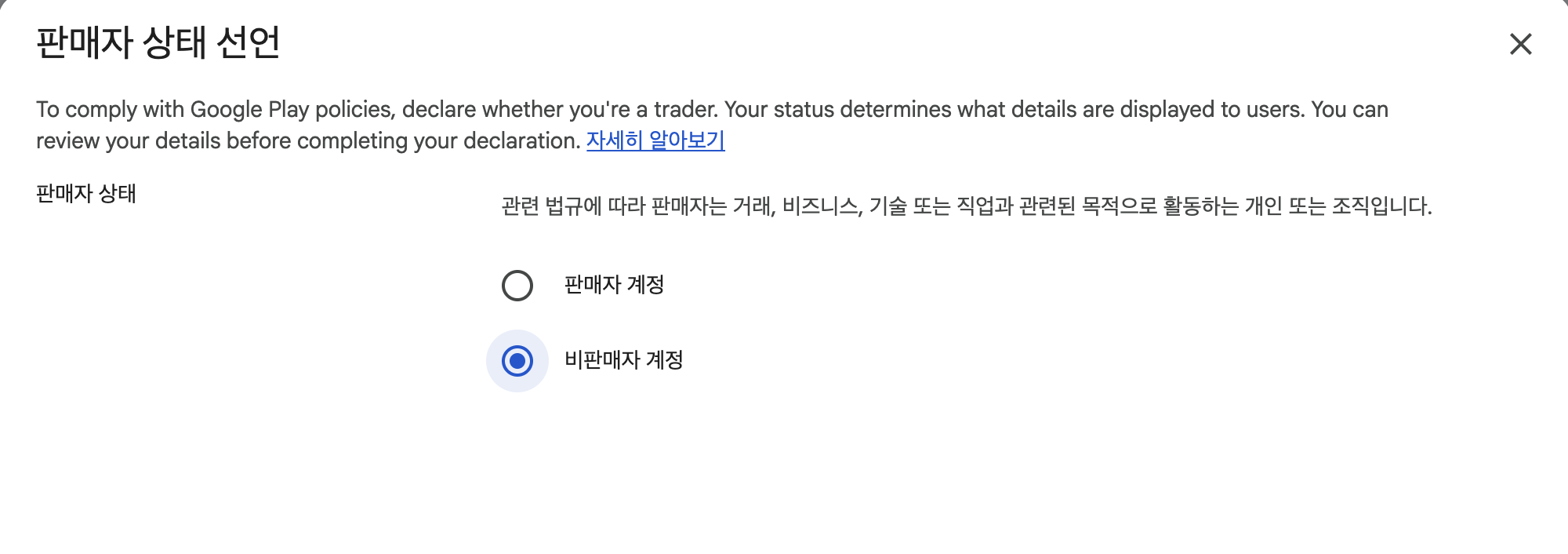
The whole process is shorter than you'd expect. One thing worth double-checking before you submit: there's a checkbox that reads "I acknowledge that my developer profile and apps may be removed from Google Play if Google is unable to verify this developer profile." Make sure whatever you enter matches your existing payments profile information before you hit submit.
What Changes Once You've Declared
Once the declaration is done, a screen called "Public developer profile details" shows your trader status, legal name and address, and developer email address all in one place. How this information actually surfaces to users differs by region.
- EEA and UK users: trader status shows up under "Provider information" on the app's detail page. If you declared as a non-trader, users see a notice along the lines of "This provider has not identified itself as a trader. This means that consumer rights stemming from EU consumer protection law do not apply."
- Users elsewhere: trader status itself isn't shown, but developer contact details like your email still appear under the "App support" section, visible to users worldwide.
Frequently Confusing Points
A few things I wondered about while going through this myself.
- Is this per account or per app? — Per account. If you've got multiple apps under one Play Console account, you only need to declare your trader status once for the whole account, not separately for each app.
- What if the app is free now but I'm planning to add ads later? — Even with no monetization right now, if you have a plan to add it later, declaring as a trader from the start saves you the hassle of coming back to update it. If your status changes down the line, you can always go back and change it then.
- What happens if I declared as a non-trader and later add ads? — Go back to the same screen and re-declare as a trader once your status actually changes. There's no automatic notification for this, so it's on you to remember to update it whenever you add a monetization feature.
- Can an individual developer (not a registered business) declare as a trader? — Yes. The definition of trader itself covers "an individual or organization," regardless of whether you're incorporated. An individual developer with a profit motive still counts as a trader.
Go Check Right Now
If you're reading this, it's worth logging into Play Console and opening Account management → Account details → About you to see where you stand. An "Action needed" badge means you haven't declared yet. There's still time before February 1, 2027, but taking care of it now means you don't have to worry later about blocked updates or a pulled app. Spending five minutes now is a lot cheaper than losing an app you've maintained for years over something this quick to fix.
backtodev
A 40-something PM returns to code. Learning, failing, and growing.