Editing Video from Just YouTube Links — A Next.js + FastAPI + yt-dlp + FFmpeg Dev Log
Stitching Clips Together Without a Video Editor
There are moments watching YouTube where you think, "I just want to splice this part with that part from another video." Normally that means:
- Download the full source with a video downloader
- Launch a video editor (heavyweight)
- Drop it on a timeline, cut, export
That's a lot of process for gluing together two or three clips. So I built a personal web tool that does: paste YouTube URLs → pick segments → set the order → merge into one MP4 and download.
The core features:
- Add multiple YouTube links (supports standard, short, and Shorts URLs)
- Play in the built-in player and mark in/out points with buttons
- Show YouTube's Most Replayed graph (the segments people rewatch most)
- Drag clip cards to reorder
- Cut with FFmpeg and merge into one MP4, with progress and cancellation
Tech Stack — Why Split Frontend and Backend
| Area | Choice | Reason |
|---|---|---|
| Frontend | Next.js 16 + TypeScript + Tailwind | Interactive UI — player, timeline |
| State | zustand | Much lighter than Redux, persist built in |
| Drag sort | dnd-kit | The de facto standard for React drag-and-drop |
| Backend | FastAPI (Python) | yt-dlp lives in Python's ecosystem, async handles long jobs |
| Download | yt-dlp | The standard tool for downloading from YouTube |
| Editing | FFmpeg | Cutting, re-encoding, merging — all of it |
My first thought was "can't a Next.js API Route just do all of this?" — but video rendering is a background job that takes minutes, which doesn't fit a request-response model. I needed a structure where a job kicks off, the frontend polls for progress, and cancellation works mid-flight — so I split off a dedicated backend.
Overall Architecture
Browser (Next.js)
  │  POST /api/videos/inspect   ← fetch metadata + heatmap
  │  POST /api/render           ← start rendering, returns jobId
  │  GET  /api/render/{jobId}   ← poll progress every second
  │  GET  /api/render/{jobId}/download
  ▼
FastAPI
  ├─ yt-dlp: download the source (once per video)
  ├─ FFmpeg: cut segments + normalize format (re-encode)
  └─ FFmpeg: concat merge → falls back to re-encode on failure
Step 1. Fetching YouTube Metadata and Most Replayed Data
yt-dlp can pull just the metadata as JSON without downloading anything.
yt-dlp --dump-single-json --no-download "https://www.youtube.com/watch?v=..."
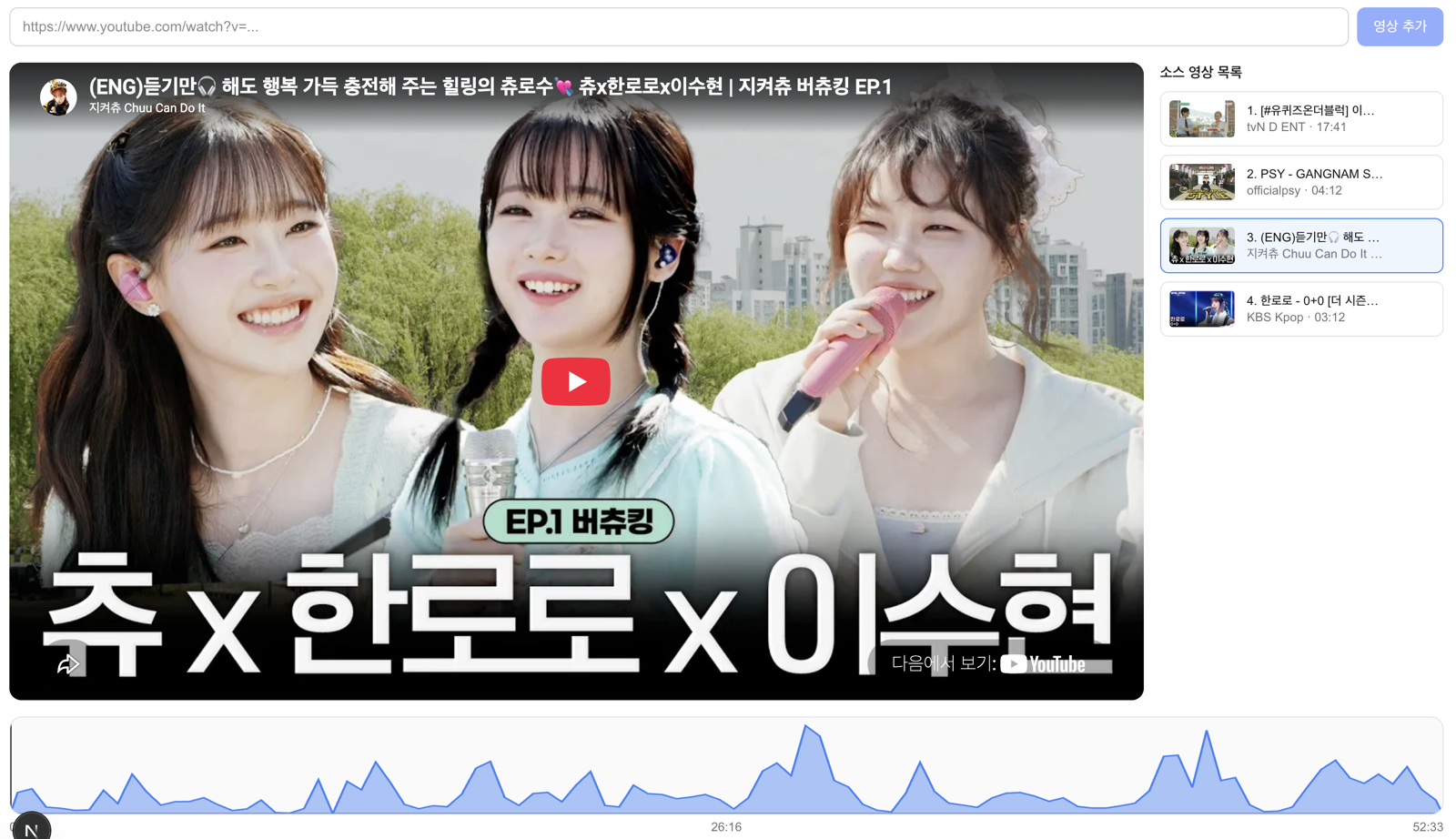
Buried in that JSON is a field worth noticing: heatmap. It's the same gray wave graph you see when hovering over the progress bar on YouTube — the "segments people rewatch the most" data, right there.
{
  "heatmap": [
    { "start_time": 0.0, "end_time": 10.6, "value": 0.87 }
  ]
}
value is a normalized interest score from 0 to 1, so rendering it as an SVG makes the highlights obvious at a glance — genuinely useful when hunting for which segment to clip.
Here's what it looks like in the actual app. That blue wave under the player is the heatmap graph, and the peaks are where people rewatch the most. Clicking the graph seeks to that point, and dragging selects a range.
One caveat: not every video has a heatmap. YouTube only generates it for videos with enough watch-time data. So there's a principle baked into the code — a failed heatmap fetch must never fail the entire lookup. If it's missing, an empty array comes back and the UI just shows a plain timeline bar instead.
Step 2. Cutting Segments — Accuracy Means Re-encoding
There are two ways to cut a segment with FFmpeg.
| Method | Speed | Accuracy |
|---|---|---|
-c copy (stream copy) | Very fast | Cuts on keyframes, up to a few seconds off |
| Re-encode | Slower | Frame-accurate |
If someone specifies "start at 2:00.5" in a clip editor and the cut actually starts at 1:58, that's a problem. So I went with re-encoding. As a bonus, re-encoding lets me normalize resolution, fps, and codec at the same time as cutting, which means clips pulled from different source videos merge cleanly later.
ffmpeg -ss 120.5 -to 210.0 -i input.mp4 \
  -vf "scale=1920:1080:force_original_aspect_ratio=decrease,pad=1920:1080:(ow-iw)/2:(oh-ih)/2,fps=30" \
  -c:v libx264 -crf 20 -c:a aac -b:a 192k -ar 48000 -ac 2 \
  clip_001.mp4
The scale + pad filter combo is the key part. Whether the source is a vertical video or 4:3, it keeps the aspect ratio, centers it on a 1080p canvas, and fills the margins with black.
Step 3. Merging — concat demuxer with a fallback
If every clip shares the same format, they can be stitched together with no re-encoding at all.
# concat.txt
file 'clip_001.mp4'
file 'clip_002.mp4'
ffmpeg -f concat -safe 0 -i concat.txt -c copy output.mp4
Since Step 2 already normalized the format, this step finishes in seconds. Occasionally the copy-merge still fails, though, so I added a fallback that re-encodes on merge if that happens.
Step 4. Background Rendering and Progress
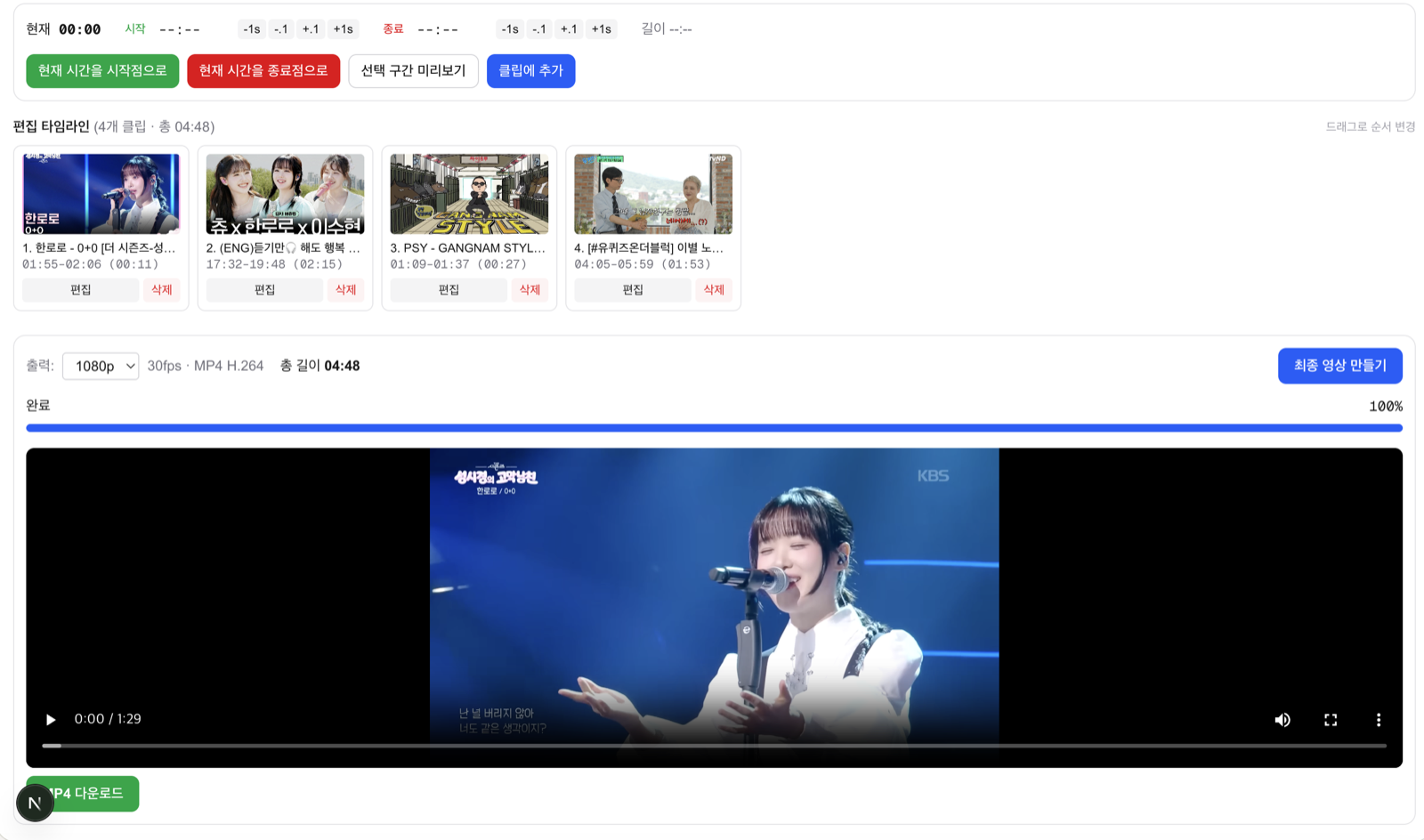
When FastAPI receives a render request, it kicks off the job with asyncio.ensure_future and immediately returns just a jobId. The job object tracks state (downloading → cutting → merging → completed) and progress, and the frontend polls it once a second.
Here's a session with clips pulled from four different videos, reordered by drag, fully rendered. Once it's done, you can preview the result right away and download it as an MP4.
Cancellation turned out to be trickier than expected — I used an asyncio.Event as the cancel signal, and made sure it kills any running yt-dlp/FFmpeg processes and cleans up temp files afterward. A few other safeguards went in alongside it:
- subprocess arguments are always passed as an array (never assembled as a shell string)
- File paths only ever use server-generated UUIDs — user input never reaches a path
- Only YouTube domain URLs are accepted
- Temp files auto-delete after 24 hours
Troubleshooting
1. "Can't I just deploy this on Vercel?" → No
The frontend, sure, but the backend is structurally a bad fit. Vercel functions are serverless — "respond in a few seconds and disappear" — while this backend needs to run the FFmpeg binary, handle jobs that take minutes, and juggle hundreds of MB of temp files. It needs an always-on server.
There's a bigger problem, too. YouTube aggressively blocks yt-dlp requests from datacenter IPs. Deploy to Railway, AWS, or any cloud provider and you're likely to hit "Sign in to confirm you're not a bot." For a personal tool, running it locally (from a home IP) is by far the least painful option.
2. Korean Folder Names and Zip — a Unicode Normalization Trap
I was zipping the project up to hand off to another Mac, and rsync --exclude '전달용/' just wasn't matching. The cause: macOS stores filenames as NFD (decomposed Hangul jamo), while the pattern typed into the shell was NFC (precomposed) — so the strings didn't actually match even though they looked identical. Whenever you're scripting against Korean filenames, always suspect this issue first. I fixed it by comparing with Python's unicodedata.normalize('NFC', name).
3. Heatmap Availability Is Inconsistent
I thought this was a bug at first, but it's just YouTube's spec. Even popular videos sometimes lack Most Replayed data. Designing for "works fine whether it's there or not" removes all the stress around it.
Wrap-Up — the Core Flow at a Glance
Enter URL
  → fetch metadata + heatmap via yt-dlp
  → select segments in the player (using the heatmap graph)
  → clips pile up in a list, drag to reorder
  → render: download once per video → re-encode cut + normalize → concat merge
  → poll progress → download the MP4
Three lessons from this project:
- Design long-running jobs as a job model from the start — split the "start" API from the "status" API, and progress, cancellation, and retry all fall out naturally.
- Normalize first, merge with copy — normalize the format at the clip stage and the final merge is nearly free.
- Treat external data (like heatmap) as nice-to-have, not required — a failing bonus feature should never block the core feature.
The whole thing is a Next.js frontend plus a FastAPI backend, packaged so a single setup.sh installs it on any other Mac. Next up, I'm thinking about auto-removing silent sections and adding vertical (9:16) output.
backtodev
A 40-something PM returns to code. Learning, failing, and growing.